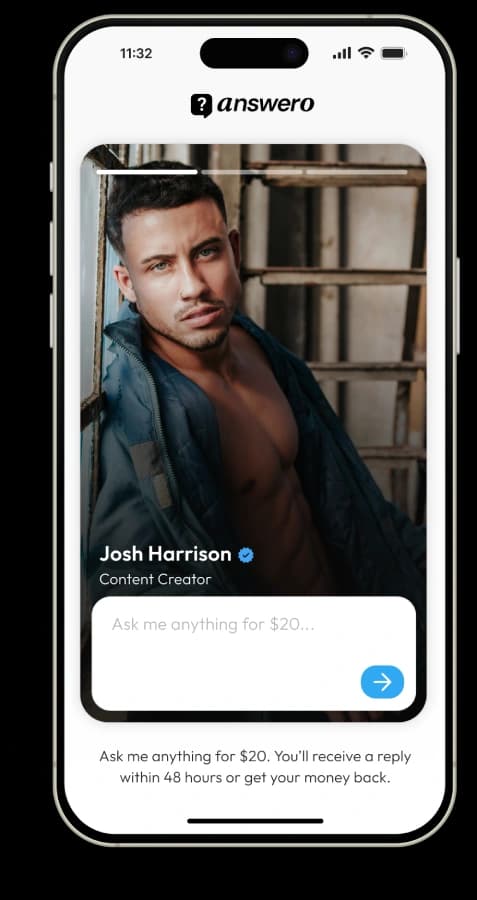

A "pay to ask me anything" page is exactly what it sounds like: a page where your followers pay a set price to ask you a question directly and get a real answer back, instead of DMing you for free. It's become a popular monetization model for creators because it requires no product, no content calendar, and no scheduling — just a page, a price, and an inbox.
The short answer: you can set one up in about five minutes using a tool built for this, like Answero. Here's exactly what that process looks like, step by step.
What you need before you start
- A Stripe account (or the ability to create one — this is where your payments land)
- A display name and, ideally, one to three photos for your page
- A price in mind for each question
That's genuinely the whole list. No website, no domain, no separate payment integration.
Step-by-step setup
1. Set your display name
This is how you appear on your page — usually your name or brand, whatever your audience already knows you as.
2. Add your photos
Most paid Q&A pages support a short carousel of photos (Answero supports up to three), shown in a story-style format. This is what a follower sees before they ask their question, so it's worth using a couple of clear, recent photos of you rather than logos or graphics.
3. Connect Stripe
This is the step that lets you actually get paid. You connect your existing Stripe account, or create one if you don't have one yet. Payments go directly to your Stripe account — the platform itself never holds your money, it simply routes the payment through.
4. Set your price
On a free plan, you'll typically choose from a small set of fixed prices — commonly $5, $10, or $20 per question. On a paid plan, you can usually set any custom price you want. Choose based on what the question is genuinely worth to the person asking: $10 to $20 is a common range for coaching-style advice, while higher-value questions (business, career, financial) can often support more.
5. Share your link
You'll get a page at a shareable URL — with Answero, something like `my.answero.app/c/[yourpage]`. Drop it into your Instagram bio, your Stories, or anywhere your audience already finds you. You don't need new traffic — you're redirecting the DM questions you're likely already getting for free.
What happens after someone asks a question
- A follower visits your page, types their question, and pays through a standard checkout — no account needed on their end.
- You get notified of the new question in your dashboard.
- You write and send your answer whenever suits you.
- The follower receives your answer by email.
If you don't answer within the guarantee window — on Answero, 48 hours — the follower is automatically refunded in full, and the question is closed. You don't need to issue the refund yourself or have an awkward conversation about it; it's handled automatically.
Deciding your price
There's no single right number, but a few starting points:
- $5 to $10 works well while you're building the habit with your audience and want a low-friction first ask
- $20 is a common landing point for coaching-style advice once you're established (this is roughly where fitness coaches tend to settle)
- $20 to $50+ tends to suit higher-stakes business, career, or financial questions, where the value of a good answer is clearly higher
You can typically change your price at any time, so it's reasonable to start lower and raise it once you've validated demand.
Managing volume once questions start coming in
You're in control of how much comes in. Most paid Q&A tools let you pause your inbox entirely (showing a "currently at capacity" message instead of the question box), and on paid plans, cap how many open questions you'll accept at once. The price itself also acts as a natural filter — it screens out low-effort or repetitive questions before they ever reach you.
Frequently asked questions
How long does it take to set up a paid Q&A page?
With a dedicated tool, about five minutes: display name, a couple of photos, connect Stripe, set a price.
Do I need a website to do this?
No. Your page is hosted for you and works as a standalone link — no website or domain required.
What if I don't answer a question in time?
The fan is automatically refunded, typically after a set window such as 48 hours. This is handled automatically, with no manual work needed on your end.
Does the platform take a percentage of what I earn?
It depends on the platform. Answero takes 0% — the only fee is Stripe's standard processing rate (2.9% + 30 cents per transaction) — and payments go directly to your own Stripe account.
Do my followers need to create an account to ask a question?
No. They typically pay through a standard checkout with no account required, and the whole process takes about a minute.
Your page can be live in about five minutes. Set up your Answero page and start getting paid to answer questions.